Jitsi is a leader in efficient video conferencing in the world of online communication. Behind its approachable exterior is a complex architecture that connects numerous components, each of which is essential to delivering a flawless conferencing experience. Exploring the architecture of Jitsi reveals a set of purpose-built services working together to form a complete communication ecosystem.
The Core Components of Jitsi's Architecture
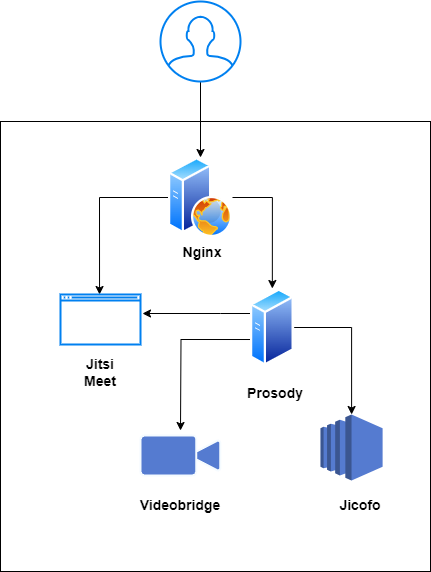
Jitsi's power comes from a collection of specialized services that handle everything from web traffic and user signaling to media routing, SIP interop, and recording. The official Jitsi Meet handbook lists Jicofo, Prosody, the Videobridge, Jigasi, and Jibri as the core server-side elements; we add Nginx and the React frontend below since every self-hosted deployment needs both.
1. Nginx: The Gateway
Nginx acts as the front door to the Jitsi ecosystem, managing web traffic and securing connections.
- Role: Serves as a reverse proxy and web server.
- Function: Delivers the Jitsi Meet web interface to users and handles HTTPS termination, ensuring all interactions are encrypted.
- Analogy: Think of it as the building's main entrance and security desk, directing visitors and ensuring only authorized access.
2. Jicofo: The Conference Orchestrator
Jicofo (Jitsi Conference Focus) is the brain of the conference, managing sessions and participant signaling.
- Role: Manages the lifecycle of a conference and acts as a load balancer between participants and the videobridge.
- Function: Coordinates the signaling process for media negotiation, manages user roles (moderator, participant), and decides which participants' media streams are sent to others.
- Analogy: It's the event coordinator, managing who is on stage and ensuring the program runs smoothly.
3. Prosody: The Real-Time Messenger
Prosody is an XMPP server that handles all real-time signaling and messaging between participants.
- Role: XMPP (Extensible Messaging and Presence Protocol) server.
- Function: Manages user authentication, presence information, and instant messaging (chat). It creates and oversees the virtual chat rooms for conferences.
- Analogy: It's the instant messaging service of the conference, handling all text-based communication and status updates.
4. Jitsi Videobridge (JVB): The Media Backbone
The JVB is the workhorse that routes audio and video streams between all participants in a conference.
- Role: Selective Forwarding Unit (SFU).
- Function: Receives audio and video streams from each participant and intelligently forwards them to the other participants. This is far more efficient than a traditional MCU (Multipoint Control Unit).
- Analogy: It's the central traffic controller for all audio and video, ensuring every participant sees and hears everyone else clearly.
5. Jigasi: The SIP Gateway
Jigasi bridges regular SIP phones and PBX systems into a Jitsi Meet conference.
- Role: SIP-to-Jitsi gateway component.
- Function: Lets a SIP client join a Jitsi Meet room as if it were a normal WebRTC participant, so dial-in users can sit in the same conference as browser users.
- Analogy: It's the translator at the door, letting a guest speaking a different protocol join the conversation. See our guide on adding a SIP gateway to Jitsi Meet with Jigasi.
6. Jibri: Recording and Streaming
Jibri captures a conference and records or streams it, using a headless Chrome instance and ffmpeg.
- Role: Recording and live-streaming service.
- Function: Renders the meeting in a browser instance the same way a participant would see it, then encodes that output to a file or an RTMP stream.
- Analogy: It's the camera operator, filming the meeting exactly as it happens for later playback. Setup steps are in our Jibri recording guide.
7. Frontend Interface: The User Experience
This is the user-facing web application that participants interact with, built with React.
- Role: The client-side application.
- Function: Provides the intuitive interface for users to join meetings, control their camera/microphone, share their screen, and use chat.
- Analogy: It's the virtual meeting room itself - the buttons, the video tiles, and the chat window that you see and use.
Jitsi Videobridge Architecture: How Media Routing Works
The Jitsi Videobridge is a Selective Forwarding Unit, not a mixer. When a participant's browser sends audio and video over WebRTC, the JVB receives that single upload and forwards copies of it to every other participant who needs it, instead of decoding and re-encoding the streams into one combined feed the way an older-style MCU would. That forwarding-only design is what keeps CPU cost per participant low and lets a single JVB instance scale to hundreds of concurrent video streams. Jicofo sits above the JVB layer and acts as the load balancer, deciding which bridge instance a given conference (or, in a multi-bridge Octo deployment, which part of a conference) should use.
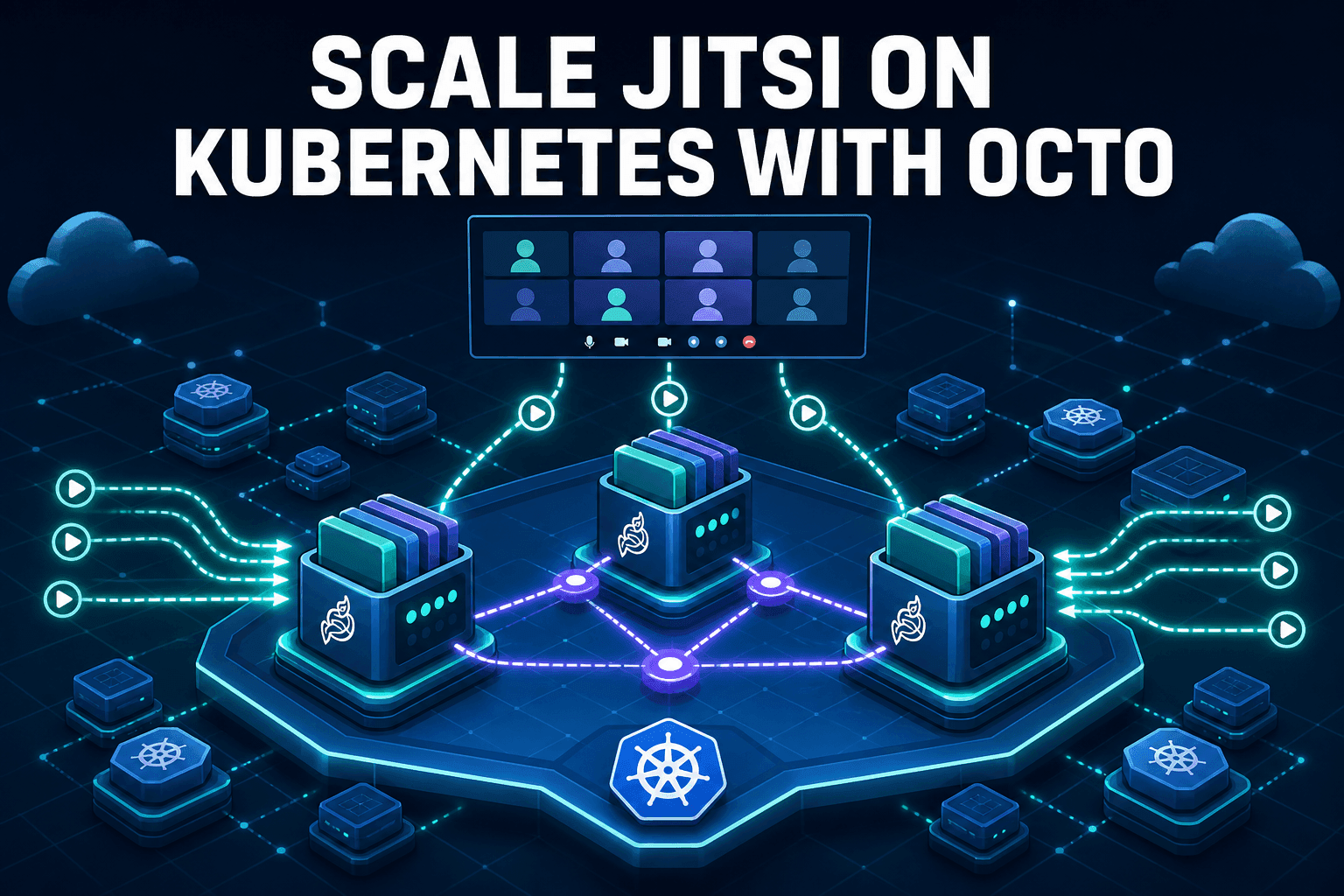
For a deeper look at running more than one videobridge behind a single deployment, see our guide on scaling Jitsi videobridges with Octo on Kubernetes.
A Symphony of Collaboration
The Jitsi architecture is a masterful display of engineering, where Nginx, Jicofo, Prosody, the Jitsi Videobridge, Jigasi, Jibri, and the Frontend Interface work in concert. Each component has a distinct and vital role, from securing the gateway to orchestrating the conference and routing media. This modular design is what makes Jitsi both powerful and flexible, creating a reliable and efficient video conferencing platform that can be tailored to any need.
Frequently Asked Questions
What is the role of the Jitsi Videobridge (JVB)?
The JVB is a Selective Forwarding Unit (SFU) that efficiently routes video and audio streams between participants. Instead of mixing streams, it forwards them selectively, which saves significant server resources and allows for larger conferences.
Why does Jitsi use both Nginx and Prosody?
Nginx and Prosody serve different purposes. Nginx acts as a reverse proxy and web server, handling HTTP/S traffic and serving the Jitsi web app. Prosody is an XMPP server that manages real-time signaling, chat, and user presence, which are essential for coordinating the conference.
What do Jigasi and Jibri do in the Jitsi architecture?
Jigasi bridges SIP phones and PBX systems into a Jitsi Meet conference so dial-in users can join alongside browser participants. Jibri records or live-streams a conference by rendering it in a headless Chrome instance and encoding the output with ffmpeg.
Can I run Jitsi without one of these components?
Jicofo, Prosody, JVB, and the frontend are required for a standard deployment. Jigasi and Jibri are optional add-ons - skip them if you don't need SIP dial-in or recording/streaming.
How does the Jitsi Videobridge scale to more participants?
A single JVB instance can handle hundreds of streams because it only forwards media rather than mixing it. Beyond that, Jicofo can distribute one large conference across multiple videobridge instances using Octo.