Introduction
Mistral AI has emerged as a standout name in the large language model (LLM) landscape, known for its innovation, performance, and adaptability. It's not just another AI model - it's a catalyst for change, pushing the boundaries of what's possible for developers and businesses building AI-driven applications.
This guide focuses on the practical side of integrating Mistral AI into your infrastructure, walking through the streamlined process of deploying it on Amazon Web Services (AWS) using Meetrix's pre-configured Amazon Machine Image (AMI). Whether you're an experienced developer or just getting started with AI, this guide provides a thorough, user-friendly walkthrough for a seamless deployment.
What is Mistral AI?
Mistral AI is a highly advanced generative text model, built around computational efficiency without sacrificing performance. It delivers remarkable accuracy and depth in language understanding and generation, making it an ideal choice for a wide range of AI-driven applications.
Key Capabilities:
- OpenAI Compatibility: Integrates seamlessly with the OpenAI framework and existing tooling.
- API Integration: Optimized for ARM64 architecture and built for easy interaction with other applications and services.
- Computational Efficiency: Delivers strong performance while remaining lightweight and accessible.
Why It Stands Out:
- Versatility: Suited for natural language processing, content creation, and complex AI tasks.
- Open-Source: Free to use and highly customizable for your own workflows.
- Compact Footprint: 7 billion parameters offer a strong balance of performance and resource usage.
Benefits of Using Mistral AI on AWS with Meetrix's AMI
Simplified Deployment
- Quick Setup: Deploy Mistral AI on AWS in just a few clicks, no complex configuration required.
- Low Barrier to Entry: Ideal for teams new to AI or with limited resources.
Optimized for AWS
- Fully Tuned: Runs efficiently within AWS's scalable cloud environment.
- Better Performance: Quicker response times and reliable AI operations.
Seamless Integration
- AWS Compatibility: Works with services like Amazon S3 and AWS Lambda out of the box.
- Easy to Extend: Simplifies incorporating AI into existing AWS-based systems.
Cost-Effective and Scalable
- Pay-As-You-Go: Only pay for the AWS resources you use.
- Scales With You: Grow your deployment without reworking your setup.
Enhanced Security and Compliance
- AWS-Grade Security: Benefit from AWS's stringent security protocols.
- Compliance-Ready: Built on infrastructure designed to meet global compliance standards.
Access to AWS Support
- Documentation and Forums: Extensive AWS resources for troubleshooting.
- Expert Assistance: Support from AWS professionals when you need it.
GDPR-Ready Self-Hosting
- Data Control: Manage data processing and storage in-house for GDPR compliance.
- Custom Protection: Implement your own encryption and access controls.
Commercial Support
- Setup and Optimization: Guided installation and performance tuning.
- API Integration Assistance: Help connecting Mistral AI to your existing systems.
Mistral AI vs GPT-4 vs Llama 4 vs Gemini vs BERT AI Model Comparison
Mistral AI, with its 7 billion parameters, offers a compact yet powerful solution for AI applications, particularly excelling in natural coding abilities. In contrast, OpenAI's GPT-4 and Google's Gemini are much larger, closed-source models with undisclosed parameter counts, built for broad general-purpose use. Mistral AI provides a more accessible, customizable, and open-source alternative that you can self-host on your own infrastructure.
| Feature/Model | Mistral AI | GPT-4 (OpenAI) | Llama 4 (Meta) | BERT | Gemini (Google) |
|---|---|---|---|---|---|
| Parameters | 7 billion | Not publicly disclosed | Multiple open-weight sizes (Scout, Maverick) | 110-340 million | Not publicly disclosed |
| Performance | Efficient in coding tasks | Advanced in language generation and reasoning | Strong multimodal and long-context performance | Strong in sentiment analysis, NLP | Strong multimodal reasoning, tightly coupled with Google Search |
| Ease of Use | User-friendly, open-source | API access, closed-source | Open-weight, self-hostable | Focused on bidirectional context | API access via Google AI Studio/Vertex AI, closed-source |
| Primary Use | Versatile, coding-focused | General language tasks | Large-scale, multimodal language modeling | NLP, sentiment analysis | Conversational responses, search-integrated answers |
| Accessibility | Open-source | Requires API key | Open-weight, downloadable | Open-source, widely used in NLP | Free tier via the Gemini app; paid API access |
| Customization | Highly customizable | Limited customization | Highly customizable, self-hostable | Limited, focused on specific NLP tasks | Limited, geared towards Google's ecosystem |
Each model has its own strengths, but Mistral AI stands out for its open-source flexibility, coding performance, and accessibility, making it an excellent choice for developers who want a customizable, self-hosted alternative to closed-source LLMs.
Prerequisites
AWS Account: Ensure you have an active AWS account with accurate billing details and the necessary permissions to create and manage resources.
Basic Knowledge: Familiarity with AWS services like EC2, IAM, and VPC, along with basic networking and DNS concepts, is required.
Required Tools:
- AWS Account Access: With permissions to create EC2 instances, VPCs, and other resources.
- SSH Client: To connect to your EC2 instance for manual configuration if needed.
- Route 53 Domain: A domain hosted on AWS Route 53, required for SSL certificate generation.
Video Guide for Quick Setup
How to Install Mistral AI - 7B on AWS via Meetrix's AMI
Step-by-Step Installation Guide
Finding and Selecting the Mistral AI AMI:
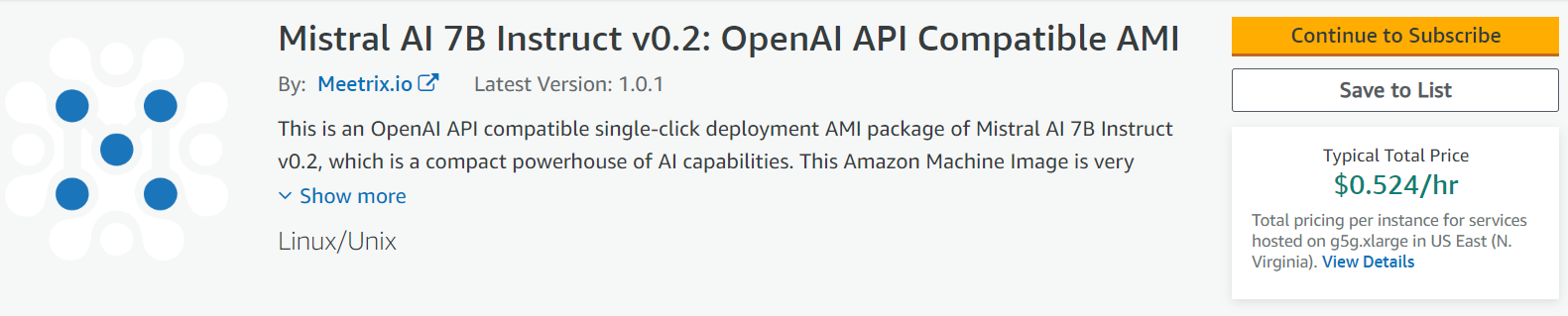
- Log in to AWS Management Console: Access the AWS Management Console and sign in with your credentials.
- Navigate to AWS Marketplace:
- Search for "Mistral AI" in the AWS Marketplace.
- Mistral 7B Multi Model LLM Bundle for ARM64
- Mistral 7B Multi Model LLM Bundle for x86
- Select the Mistral AI Product: Choose the appropriate Mistral AI AMI from the listed options.
Initial Setup and Configuration:
- Subscribe to the AMI: Click "Continue to Subscribe" and accept the terms and conditions.
- Configuration Settings: Select "Continue to Configuration" and choose your preferred AWS region for deployment.
Launching CloudFormation for Mistral AI:
- Select Launch Option: On the "Launch this software" page, choose "Launch CloudFormation" from the dropdown menu.
- Click "Launch": Begin the CloudFormation stack creation process.
Creating and Configuring the CloudFormation Stack:
- Prepare the Template: Ensure "Template is ready" is selected, then click "Next".
- Specify Stack Options:
- Enter a unique "Stack name".
- Provide an "Admin Email" for SSL certificate generation.
- Choose a deployment name and key name.
- Specify "MistralDomainName" for SSL setup (ensure the domain is hosted on AWS Route 53).
- Choose Instance Type: The recommended type is g5g.xlarge.
- Configure Networking: Set "SSHLocation", "SubnetCidrBlock", and "VpcCidrBlock" as needed.
- Review and Create the Stack: Verify entered details, acknowledge IAM resource creation, and click "Submit".
Updating DNS Settings:
- Copy the Public IP Address: Find "PublicIp" in the "Outputs" tab of your stack.
- Update DNS in Route 53: Navigate to "Hosted Zones", edit the DNS record to point to the copied "PublicIp", and save changes.
Accessing Mistral AI:
- Use the "DashboardUrl": Access the Mistral AI application using the URL provided in the "Outputs" tab.
Generating SSL Manually (If Needed):
- Copy the Public IP Address.
- Log in to the Server via SSH:
ssh -i <your key name> ubuntu@<Public IP address> - Generate SSL Certificate: Run the following command and provide your admin email when prompted:
sudo /root/certificate_generate_standalone.sh
Shutting Down and Removal:
- Stop the Instance: Via the EC2 "Instance state" options, stop the Mistral instance.
- Remove the Stack: Delete the CloudFormation stack if needed from the AWS Management Console.
By following these steps, you can effectively deploy Mistral AI - 7B on AWS using Meetrix's pre-configured AMI, ensuring a streamlined and efficient setup process.
Utilizing Mistral AI's API for Advanced Integration
API Capabilities:
- Mistral AI offers a robust API, enabling seamless integration with various applications and custom development.
- Example Use Cases: Integrating Mistral AI into a chatbot for enhanced conversational abilities, or using it for content generation in a content management system.
- API Endpoints: Utilize endpoints like
/v1/completionsor/v1/embeddingsfor specific functionality.
Getting Started with the API:
- API Documentation: Refer to the detailed Mistral API documentation.
- Authentication: Use BasicAuth for authentication and follow the request format as per the documentation.
- Testing and Deployment: Test API integrations in a development environment before deploying to production.
Troubleshooting and Support for Mistral AI Setup
Common Challenges:
- Dashboard Not Accessible: Check that "PublicIp" is correctly updated in DNS settings and verify network accessibility.
- SSL Setup Failures: Ensure the domain is correctly hosted on Route 53 and manually run the SSL generation script if needed.
- API Connection Errors: Validate API endpoint URLs and credentials, and ensure network rules allow API communications.
Accessing Technical Support:
- Meetrix Support: Contact aws@meetrix.io for personalized assistance.
- AWS Support: Use AWS Support for issues related to EC2, Route 53, or CloudFormation.
- Community Forums: Engage with community forums for shared experiences and solutions.
Cost-Efficiency Analysis of Deploying Mistral AI on AWS
Deploying Mistral AI on AWS with Meetrix's AMI offers a blend of advanced AI capabilities and cost efficiency. Software costs are pegged at $0.104/hr, applicable across various EC2 instance types, with infrastructure costs varying based on the instance type chosen.
| EC2 Instance Type | Hourly Cost | Approx. Monthly Cost (24/7 Usage) |
|---|---|---|
| g5g.xlarge (Recommended) | $0.524 | $378.32 |
| g5g.2xlarge | $0.660 | $475.20 |
| g5g.4xlarge | $0.932 | $671.04 |
| g5g.8xlarge | $1.476 | $1,062.72 |
| g5g.16xlarge | $2.848 | $2,052.32 |
Optimization Strategies:
- Right-Sizing Instances: Select an instance type that aligns with your processing needs to avoid overpaying for unutilized resources.
- Spot Instances: Consider AWS Spot Instances for non-critical, flexible tasks to significantly cut costs.
- Reserved Instances: For consistent, long-term use, Reserved Instances offer substantial savings over standard pricing.
- Regular Monitoring: Use AWS monitoring tools to track usage and optimize resource allocation.
The cost of deploying Mistral AI on AWS can be managed effectively through careful selection of EC2 instances and cost-optimization strategies. By understanding your AI application's needs and regularly monitoring usage, you can maintain a balance between performance and budget.
Conclusion
Deploying Mistral AI - 7B on AWS using Meetrix's pre-configured AMI provides a fast, secure, and cost-effective way to bring an OpenAI-compatible LLM into your infrastructure. By following this guide, you can efficiently set up, integrate, and maintain Mistral AI while keeping full control over your data and costs. For further support, reach out to Meetrix Support and take your AI-driven applications to the next level.
Frequently Asked Questions
What is Mistral AI - 7B?
Mistral AI - 7B is a highly efficient, open-source large language model with 7 billion parameters. It's OpenAI API compatible and optimized for ARM64 architecture, making it well suited for coding tasks, content generation, and custom AI application development.
What are the key benefits of deploying Mistral AI on AWS with Meetrix's AMI?
Simplified one-click deployment, full optimization for the AWS environment, seamless integration with AWS services, a pay-as-you-go cost model, enhanced security and compliance, and access to AWS's support resources and documentation.
Is Mistral AI compatible with OpenAI?
Yes. Mistral AI is designed with OpenAI API compatibility, allowing it to integrate with existing OpenAI-based tooling and workflows with minimal changes.
How much does it cost to run Mistral AI - 7B on AWS?
Software costs are $0.104/hr on top of your chosen EC2 instance. The recommended g5g.xlarge instance runs at $0.524/hr (about $378/month for 24/7 usage), with larger instance types available for heavier workloads.
What should I do if automatic SSL setup fails?
SSH into your server and run the manual SSL generation script: sudo /root/certificate_generate_standalone.sh, then provide your admin email when prompted.
How do I get commercial support for Mistral AI - 7B?
Meetrix offers commercial support covering setup and optimization, API integration assistance, custom configuration for specific use cases, and GDPR compliance guidance. Contact aws@meetrix.io for assistance.
Deploy Mistral AI - 7B on AWS Today
Launch your own Mistral AI - 7B instance with Meetrix's pre-configured AMI and take full control of your AI deployment.
Get Started on AWS Marketplace