Table of Contents
A WebRTC leak is your browser handing over your real IP address to a website while you think you're hidden behind a VPN. It's not a bug in your VPN and it's not malware. It's WebRTC doing exactly what it was designed to do: find the fastest possible network path between two browsers, which means figuring out your actual IP address first.
What is a WebRTC leak
WebRTC (Web Real-Time Communication) is the browser API behind video calls, voice chat, and peer-to-peer file transfer that runs without a plugin. Jitsi, Google Meet, Discord voice, and most browser-based video calling tools use it.
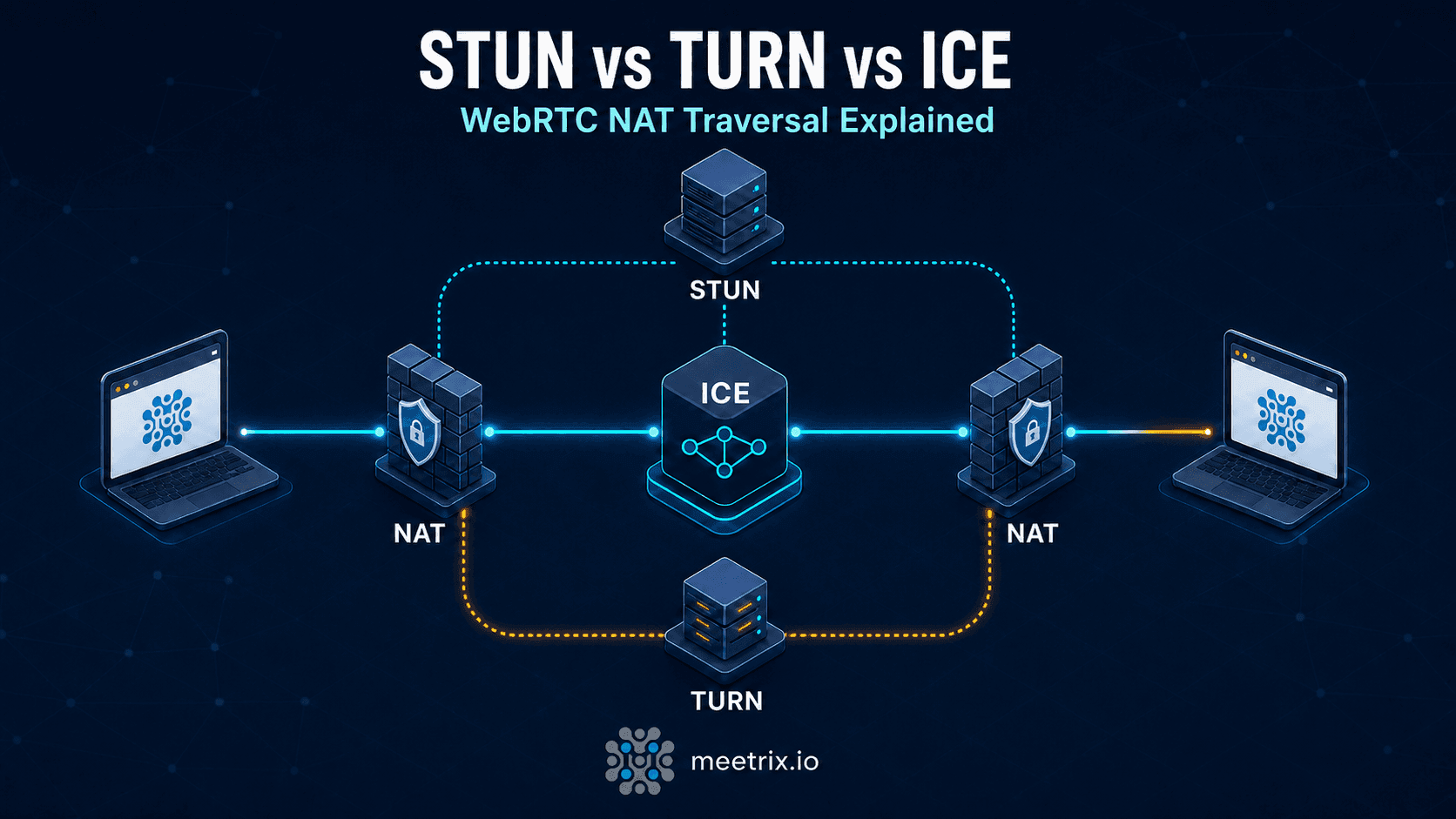
To connect two browsers directly instead of relaying every packet through a server, WebRTC needs to know each side's actual IP address. It gets that using STUN (Session Traversal Utilities for NAT), a lightweight query that asks a server "what's my public IP as seen from outside my router?" That query runs through the browser's own network stack, not through whatever tunnel your VPN client has set up for the rest of your traffic. If your VPN doesn't specifically intercept it, the STUN response comes back with your real IP, and any page running WebRTC JavaScript can read it.
This is a VPN gap, not a VPN failure
How the leak actually happens
- A page loads WebRTC code (a video call widget, an ad network's fingerprinting script, anything calling RTCPeerConnection).
- The browser sends a STUN request to discover its public IP for the ICE candidate-gathering process.
- That request goes out through the OS network stack, which for most VPN setups is exactly where the tunnel should catch it, but often doesn't.
- The page's JavaScript reads the returned IP candidates directly, no server round-trip required, and now has your real address.
This is also why the fix isn't as simple as "block WebRTC." STUN, TURN, and ICE are the same mechanism that makes peer-to-peer video calling fast in the first place, and the same candidate-gathering process MDN documents for building WebRTC apps is what leaks your IP as a side effect. Our STUN vs. TURN vs. ICE breakdown and WebRTC architecture guide cover how that negotiation works if you want the deeper mechanics.
It's not evenly distributed across browsers
What actually gets exposed
| Exposed | Not exposed |
|---|---|
| Your real public IP address | Browsing history or page content |
| Rough geographic location (city-level, via IP) | Login credentials or session cookies |
| Your ISP, derivable from the IP block | Files or clipboard contents |
The practical risk is correlation, not data theft. If a site or advertiser can tie your VPN session to your real IP once, they can potentially link your "anonymous" browsing to your actual identity or location across future visits.
How to test for it
Connect your VPN, then open browserleaks.com/webrtc or ipleak.net. Both list every IP address your browser's WebRTC stack is willing to hand out. Compare it against your VPN's IP (check that separately at any "what's my IP" page with the VPN on).
Local IPs aren't automatically a leak
If you'd rather watch it happen than trust a third-party site, open DevTools (F12), go to the Network tab, and load one of the leak-test pages above with WebSocket/other filters cleared. You'll see the STUN request go out and the candidate IPs come back in the response, the same data the test site is just formatting for you.
Fixing it per browser
| Browser | What to do | Trade-off |
|---|---|---|
| Firefox | about:config → set media.peerconnection.enabled to false | Disables WebRTC entirely, breaks Meet, Discord voice, and any site using RTCPeerConnection |
| Chrome / Edge | No user-facing toggle. Use an extension built on Chrome's webRTCIPHandlingPolicy API (see below) | Requires trusting a third-party extension |
| Safari | WebRTC has been on by default since Safari 11; there's no simple disable switch either | Fewer extension options than Chrome/Firefox |
Because a full WebRTC kill switch breaks legitimate video calling, a
browser extension that restricts WebRTC's routing rather than
disabling the whole API is the more practical fix for most people.
Chrome exposes a
privacy API
that lets an extension set webRTCIPHandlingPolicy to
disable_non_proxied_udp, which forces WebRTC to route
through whatever proxy or VPN interface is configured instead of
reaching out directly. WebRTC Leak Prevent
is a current, open-source extension built on that exact API.
uBlock Origin no longer does this on desktop
Whichever fix you pick, re-run the test from the previous section afterward. Extensions get disabled by browser updates more often than people expect.
Where your VPN fits in
Not every VPN handles this the same way, and marketing copy ("military- grade encryption," "complete anonymity") tells you nothing about WebRTC specifically. Before trusting a VPN to cover this, look for:
- An explicit mention of WebRTC leak protection in the VPN's own documentation, not just DNS leak protection or a kill switch (those are different mechanisms)
- A browser extension from the same vendor, since WebRTC leak blocking is usually implemented at the extension level, not the OS-level VPN client
- Independent test results, not just the vendor's own claims
Then verify it yourself with the test from earlier, on the actual browser and device you use day to day. A VPN that blocks WebRTC leaks on desktop Chrome doesn't necessarily do the same on its mobile app.
If you'd rather not depend on a third-party VPN vendor's word for any of this, running your own is the alternative. Our self-hosted VPN comparison covers OpenVPN, WireGuard, and Headscale setups where you control the client configuration end to end.
If you're building on WebRTC
If you're the one running the video conferencing infrastructure rather than just using it, the leak conversation flips: you want accurate IP discovery so calls connect peer-to-peer instead of relaying through a TURN server for every session. The privacy question then becomes what your own client-side code does with candidate IPs it gathers, and whether you're logging them anywhere you shouldn't be. Self-hosted deployments (Jitsi behind your own coturn instance, for example) give you visibility into that data flow that a hosted SaaS tool doesn't.
IP addresses count as personal data under GDPR and similar regimes, so if your app handles EU users, logging raw candidate IPs from WebRTC sessions is a decision worth making deliberately rather than by default. See our notes on GDPR-compliant WebRTC deployments and our Jitsi Meet security best practices if you're the one operating the infrastructure rather than just a user of it.
Frequently Asked Questions
What is a WebRTC leak?
A WebRTC leak is when your browser's WebRTC engine exposes your real IP address to a website, even though you're connected through a VPN. It happens because WebRTC does its own IP discovery (via STUN) outside the VPN's control, not because the VPN itself failed.
How do I test for a WebRTC leak?
Open browserleaks.com/webrtc or ipleak.net with your VPN connected. If you see any IP address besides your VPN's, that's a leak. Local/private IPs (192.168.x.x, 10.x.x.x) showing up are not a leak on their own since Chrome hides those behind mDNS by default, but a public IP that isn't your VPN's is.
Does disabling WebRTC in the browser fix it?
Yes, but it's a blunt instrument. In Firefox, setting media.peerconnection.enabled to false in about:config disables WebRTC entirely, which also breaks Google Meet, Discord voice, and any site that calls RTCPeerConnection. Chrome has no equivalent single toggle. If you rely on WebRTC-based video calling day to day, a scoped extension is usually a better trade-off than disabling the API outright.
What does a WebRTC leak actually expose?
Your real public IP address. From that, a site can derive your rough geographic location and ISP, and correlate it with other sessions where your VPN wasn't active. It doesn't expose browsing history, credentials, or file contents.
Why does this matter if I'm already using a VPN?
Because the leak happens at a layer the VPN doesn't touch. A VPN reroutes your general IP traffic, but WebRTC's STUN requests can resolve your real IP directly through the network stack. Whether your specific VPN blocks this depends on whether the vendor built WebRTC handling into their client, not on the VPN protocol itself.
How do I stop a VPN from leaking WebRTC traffic?
Check whether your VPN client documents WebRTC leak protection specifically (not just 'kill switch' or 'DNS leak protection', which are different things). If it doesn't, or you're not sure, add a WebRTC-blocking browser extension as a second layer and re-test with the VPN on.
Are Chrome and Firefox both vulnerable?
Both implement WebRTC, so both can leak. Chrome has masked local network IPs behind mDNS hostnames by default since Chrome 75 (2019), which closes off one leak path automatically. It does not touch STUN's ability to discover your actual public IP. Safari has supported WebRTC by default since Safari 11, so the old advice that Safari is 'immune' is out of date.
Is this a mobile browser problem too?
Yes. Mobile Chrome and Firefox implement the same WebRTC stack as desktop, so the same STUN-based leak applies. The fix is the same: check your VPN app's WebRTC handling, and use a WebRTC-blocking extension if your mobile browser supports extensions.
Running WebRTC infrastructure of your own?
We deploy and secure self-hosted Jitsi and coturn setups for teams who want to control where call and connection data actually goes.
Talk to our team