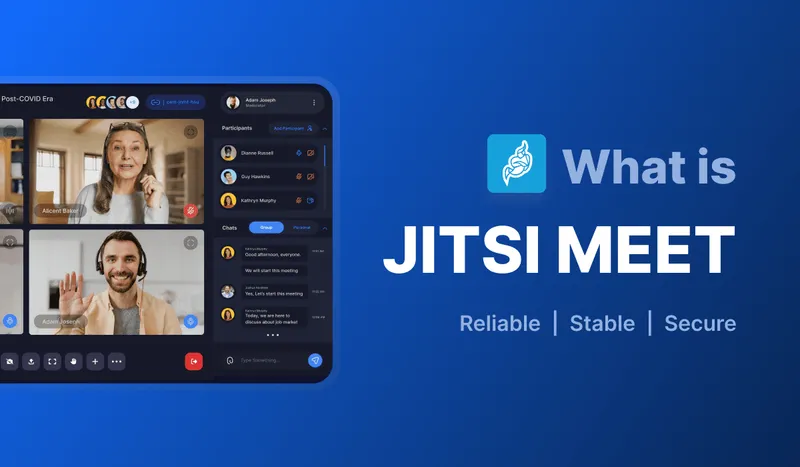
🚀 Quick Overview
Jitsi Meet is a free, open-source video conferencing platform that requires no downloads, no accounts, and offers unlimited meeting time. Perfect for businesses, education, healthcare, and personal use.
Introduction
Remote work, often dubbed Work-From-Home (WFH), has seen a significant rise after the Covid-19 pandemic and the enforced lockdowns that came with it, propelling workers to engage in their jobs from the safety of their homes. Although this was once done out of necessity, it is now a readily available option in most companies. Despite its convenience, it is not quite the same as working with peers in a company setting and this lack of social interaction has popularized the use of web meeting platforms to bridge the gap between remote workers.
Jitsi Meet is an open-source meeting platform created to meet the rising demand for web spaces to hold meetings and exchange information. Meeting platforms such as Jitsi Meet provide the unique opportunity to maintain professional contact while also allowing for entertainment, which is considered necessary for workers confined to their homes rather than a shared workspace.
What is Jitsi Meet?
Jitsi Meet is the open-source video conferencing app built on the Jitsi project, one of the more accessible platforms for both commercial and personal use. As with other meeting platforms, Jitsi Meet provides users access to recurrent meetings and allows for the creation and sharing of new links. Unlike most, however, Jitsi Meet doesn't put a time limit on a call, so longer conversations don't come with a countdown to watch.
The user-friendly interface allows for ease of access and contributes to its simplicity. Jitsi Meet is equipped with end-to-end encryption to protect and safeguard the data shared within its platform, ensuring the privacy of its users. It can host meetings with a large number of participants, well beyond a typical team call. Jitsi Meet has an array of features that facilitate easy and excellent communication. If you're deciding between it and other platforms, see our comparison of Jitsi vs Zoom vs Google Meet.
🔑 Key Features at a Glance
- No Time Limits: Host meetings for as long as you need
- No Downloads Required: Works directly in your web browser
- End-to-End Encryption: Your conversations stay private
- Unlimited Participants: Scale to meet your needs
- Cross-Platform: Works on desktop, mobile, and tablets
How Does Jitsi Meet Work?
Jitsi Meet runs entirely in the browser using WebRTC, the same technology behind most modern video calling, so there's nothing to install. Starting a meeting just means creating a link and sharing it; anyone with the link can join straight from Chrome, Firefox, Safari, or the mobile app. Behind the scenes, a component called the Jitsi Videobridge (JVB) routes audio and video between participants, which is what lets a call scale past a handful of people without every device connecting directly to every other device. The full source, including the videobridge, is on Jitsi's GitHub.
Jitsi Meet Features That Set It Apart
The market of web platforms is oversaturated and choosing one that fits your needs is not an easy task. Jitsi Meet is one-of-its-kind with multifaceted features that can easily be integrated into multiple sectors of work. Here are the core Jitsi Meet features that make it stand out:
📹 High-Quality Video Conferencing
Real-time video conferencing with adaptive quality settings. Choose between high-definition for stable connections or low-bandwidth mode for slower internet speeds. Perfect for remote teams staying connected.
🖥️ Screen Sharing
Share your entire screen or specific applications instantly. Ideal for presentations, collaborative work, training sessions, and educational content delivery. No additional software required.
💬 Real-Time Chat
Built-in messaging system for instant communication during meetings. Share links, files, and important information without interrupting the conversation flow.
🎥 Meeting Recording
Record meetings for future reference and share with team members who couldn't attend. Recordings are stored securely in cloud storage for easy access.
Is Jitsi Meet Safe?
🔒 Privacy & Security
End-to-end encryption protects all communications. Meetings are ephemeral - they exist only during active sessions. No account creation required, and no personal data is stored permanently. See our guide to how Jitsi Meet's encryption works for the technical detail.
- Advanced encryption protocols
- No data retention policies
- Participant moderation controls
- Secure meeting rooms
🌐 Universal Compatibility
Works seamlessly across all devices and platforms. No downloads required - just click and join from any modern web browser or use the mobile app.
- Web browsers (Chrome, Firefox, Safari, Edge)
- Mobile apps (iOS & Android)
- Desktop applications
- No installation required
Industry Applications: Where Jitsi Excels
Jitsi Meet is versatile enough to serve multiple industries, each with unique requirements for communication and collaboration.
🏢 Corporate & Business
Perfect for remote teams, client meetings, and international collaborations. Jitsi bridges geographical gaps, enabling seamless business communications across continents without the overhead of expensive enterprise solutions.
🎓 Education & E-Learning
Ideal virtual classroom solution for educators and students. Features like screen sharing replicate traditional whiteboards, while chat functionality enables real-time Q&A sessions and collaborative learning.
🏥 Healthcare & Telemedicine
High-resolution video quality supports medical consultations and patient assessments. When self-hosted with the right access controls and a signed BAA, it fits HIPAA-governed workflows for virtual appointments. See our full look at video conferencing in healthcare.
🛡️ Defense & Government
Strong encryption and open-source transparency, meaning the code can be independently audited, make it a reasonable fit for sensitive government communications when self-hosted on infrastructure the organization controls. Read more on secure military communications with Jitsi Meet.
💰 Finance & Banking
Secure platform for financial discussions, market analysis, and investment planning. Easy-to-use interface reduces training time while maintaining the highest security standards for confidential financial data.
🏠 Personal & Family Use
Stay connected with family and friends through unlimited, free video calls. Perfect for virtual family gatherings, online gaming sessions, and maintaining personal relationships across distances.
Pros & Cons: Making an Informed Decision
✅ Strengths of Jitsi Meet
- User-Friendly: Intuitive interface that works for tech novices and experts alike
- Open Source: Fully customizable and transparent codebase
- Cross-Platform: Works on any device or operating system
- Security First: End-to-end encryption and password protection
- No Cost: Completely free with no hidden fees or subscriptions
- No Time Limits: Host meetings for as long as needed
- Privacy Focused: No account required, no data retention
⚠️ Considerations & Limitations
- Internet Dependency: Requires stable internet connection for optimal performance
- Scalability Limits: May experience strain with very large conferences (100+ participants)
- Feature Set: Fewer advanced features compared to premium enterprise solutions
- Support: Community-based support rather than dedicated customer service
Note: These limitations are minor compared to the benefits, especially considering Jitsi is completely free.
🎯 Key Takeaways
- Jitsi Meet is a completely free, open-source video conferencing platform
- No downloads, accounts, or time limits - just instant communication
- Enterprise-grade security with end-to-end encryption
- Perfect for businesses, education, healthcare, and personal use
- Cross-platform compatibility ensures everyone can join
- Privacy-focused design with no data retention
Conclusion
Jitsi Meet is uniquely positioned in the web platform market as it is a free, open-sourced but highly scalable platform, and it offers a variety of features that can easily be integrated into multiple work environments. It is fairly safe and does not require any special technical training to navigate.
It drives a hard bargain to become your go-to real-time communication platform, and who could blame you? It's convenient, multi-faceted, and most importantly, free. The next time you want to get in touch with a colleague without having to walk to their cubicle, or when you want to get a quick medical assessment but don't want to drive yourself to the hospital, Jitsi Meet is the one-click solution you've been looking for.
Frequently Asked Questions
Is Jitsi Meet safe?
Yes. Jitsi Meet encrypts media in transit by default, offers end-to-end encryption for smaller calls, and its code is fully open source and auditable. No account is required, so it doesn't collect the personal data a signup would.
How does Jitsi work?
It runs in the browser using WebRTC, no download needed. Creating a meeting just means sharing a link; a videobridge (JVB) routes the audio and video between participants once a call grows beyond a couple of people.
Does Jitsi Meet have a time limit?
No. Jitsi Meet has no built-in meeting duration cap, unlike the free tiers of Zoom or Google Meet, which cap group calls at 40 or 60 minutes.
Who owns Jitsi?
Jitsi started as an open-source project, was later owned by Atlassian, and has been sponsored and maintained by 8x8 since 2018. Development stays open source, with contributions from the community alongside 8x8's team.
What is Jitsi Meet used for?
Video meetings for businesses, classrooms, healthcare consultations, and personal calls, anywhere a quick, encrypted video call without an account or app download is useful.